Professional

MBOX Email Converter

Experts’ first choice to bulk convert MBOX emails into 30+ different file formats and email clients. It supports all the MBOX file variants and ensures complete data integrity. This MBOX file exporter is very easy to use and has advanced features to save MBOX files efficiently.

Email Headers

Email Headers

Support all email header information.

Email Body

Email Body

Save all the MBOX file message content.

Maintain Label

Maintain Labels

Allows ignoring or retaining Gmail labels.

Maintain Label

MBOX Variants

Convert MBOX files of all variants swiftly.
mbox converter

One-Stop Solution

Ultimate MBOX Converter Tool

  • Has dual selection modes to browse and select the desired MBOX file or folder to convert.
  • Offers multiple advanced filters to bulk convert MBOX files in a decluttered way.
  • Gives file naming and file saving destination options to organize and access the output easily.
  • Generates a SavingsLog.txt report once the process to convert MBOX files completes.
  • Has a very user-friendly interface so that even non-tech users can use this tool swiftly.
  • Supports attachments and other attributes of the MBOX file to ensure data originality.

Free Trial Edition: Our MBOX File Converter Tool also offers a demo version, which is completely free of cost and lets first-time users test the software’s functionality for free.

Simplified Licensing

Get Standard License at $29.00 Only

Download Now

Purchase Now

norton mcafee

Use Cases

Scenarios to Use the MBOX Email Converter

Legal Forensics

Legal Forensics

This MBOX file exporter saves MBOX data in a legally acceptable file format. Thus, it helps advocates, lawyers, and forensic investigators convert MBOX files efficiently, which they can also print and use.

Migrate to Cloud

Migrate to Cloud

With this tool, one can also convert MBOX files to cloud platforms such as Office 365, Outlook.com, Amazon Workmail, Google Workspace, etc. This makes accessing email on web-based platforms easier.

MBOX Compatibility

MBOX Compatibility

Our MBOX Email Converter offers multiple export options, which include PST, PDF, EML, OLM, DOC, TXT, HTML, etc., making the MBOX file compatible with different email clients or applications.

benefits of mbox converter

Benefits at a Glimpse

Why Choose the Best MBOX Converter?

There are a number of prominent email clients that export their mailbox data in the MBOX file format. Thus, to manage, convert, backup, import, or fix these files, this MBOX email converter works the best. Take a quick glimpse at all the highlights or the advantages that one gets with this utility.

  • Support All Windows Edition
  • Very Cost-Effective
  • Technical Support Available
  • Maintain Folder Hierarchy
  • Completely An Independent Tool
  • Work Offline to Save MBOX
  • Ensure Data Safety and Integrity
  • Convert MBOX File Attachments
  • Advanced Features for Efficiency
  • Supports All Email Attributes
  • Has Smart Filter Options
  • Trusted by Industry Experts
  • No File-Size Limitation
  • Has OAuth Authentication
  • Remote Services to Convert MBOX
  • In-house Development Team

Core Features

Prominent Features of MBOX Email Converter

30+ Saving Options

30+ Saving Options

This MBOX File Converter Tool has a range of export options, which include multiple email clients and file extensions. Some of them are PST, PDF, EML, MBOX, MSG, OLM, DOC, TXT, CSV, MHT, HTML, Zimbra, Maildir, Gmail, Thunderbird, Outlook, Yahoo, etc. This feature makes it a one-stop solution to convert MBOX file swiftly.

Dual Selection Modes

Dual Selection Modes

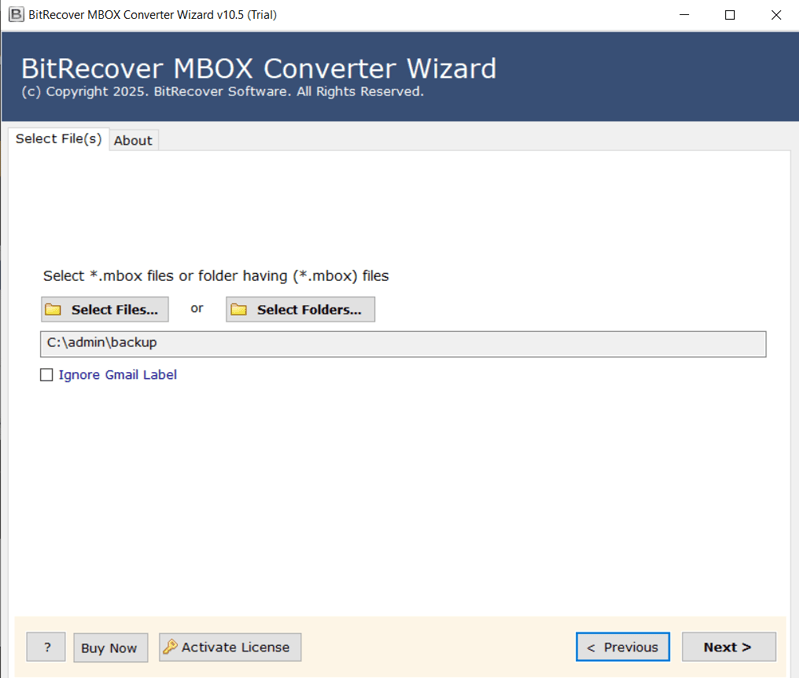
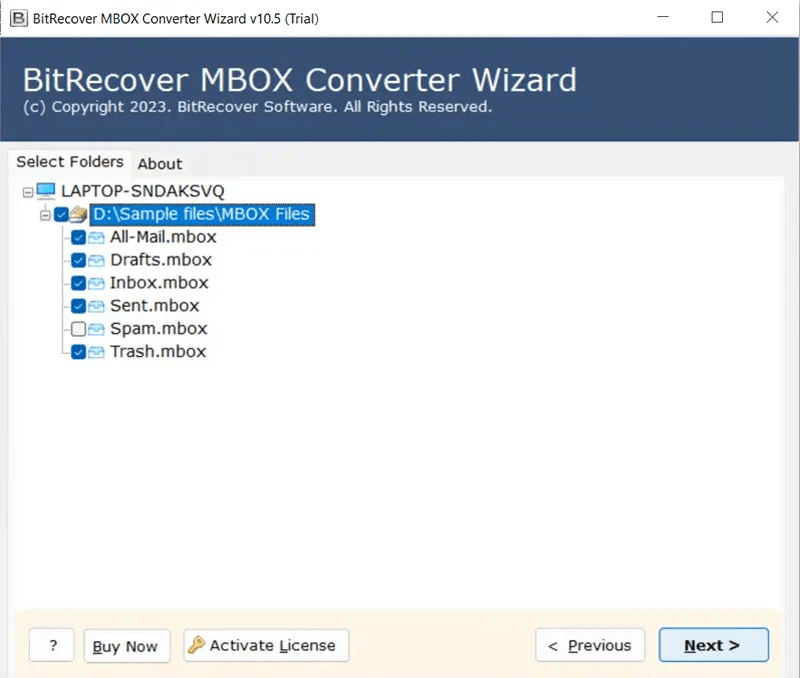
The best MBOX email converter has dual file selection options, which include Select Files and Select Folder. It allows browsing and choosing the desired single MBOX files or the entire folder, accordingly. In further selection steps, the user can preview the mailboxes and select the required ones for a decluttered output.

Ignore Gmail Label

Ignore Gmail Label

There is also an option of “Ignore Gmail Label” for those who want to convert MBOX files that are extracted from Google Takeout. By clicking on this option, the software does not follow the folder hierarchy as mentioned in the selected MBOX folder. However, by default, it stays unchecked, which ultimately converts MBOX files according to the original labelling.

Maintain Data

Maintain Data Originality

This MBOX Email Converter ensures complete mailbox data authenticity by supporting each and every element of the MBOX file. Therefore, from the folder hierarchy to the attachments and attributes such as date, time, layout, content, hyperlinks, signature, multimedia, etc., this MBOX converter software keeps everything intact. This proves the software’s capabilities and credibility.

Special Feature

Special Feature for Outlook

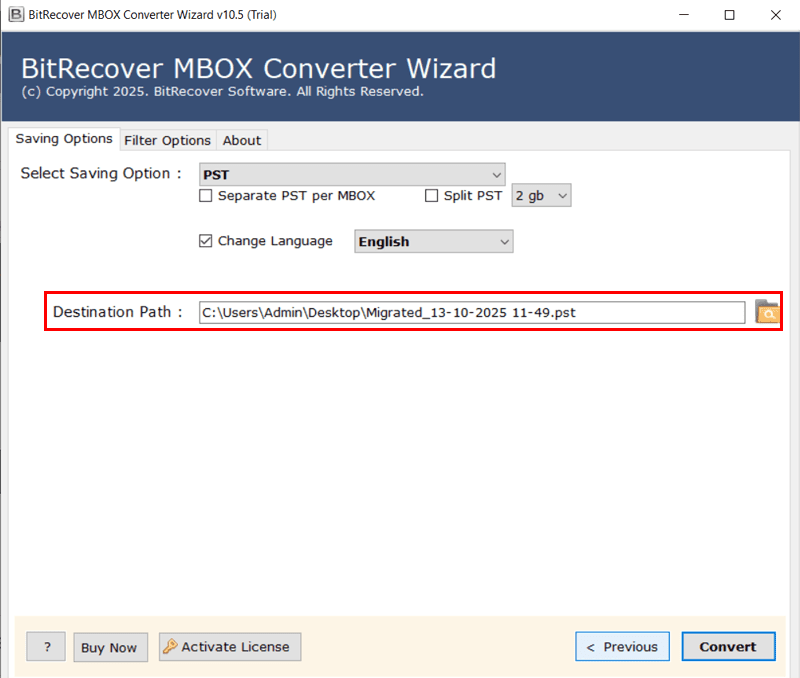
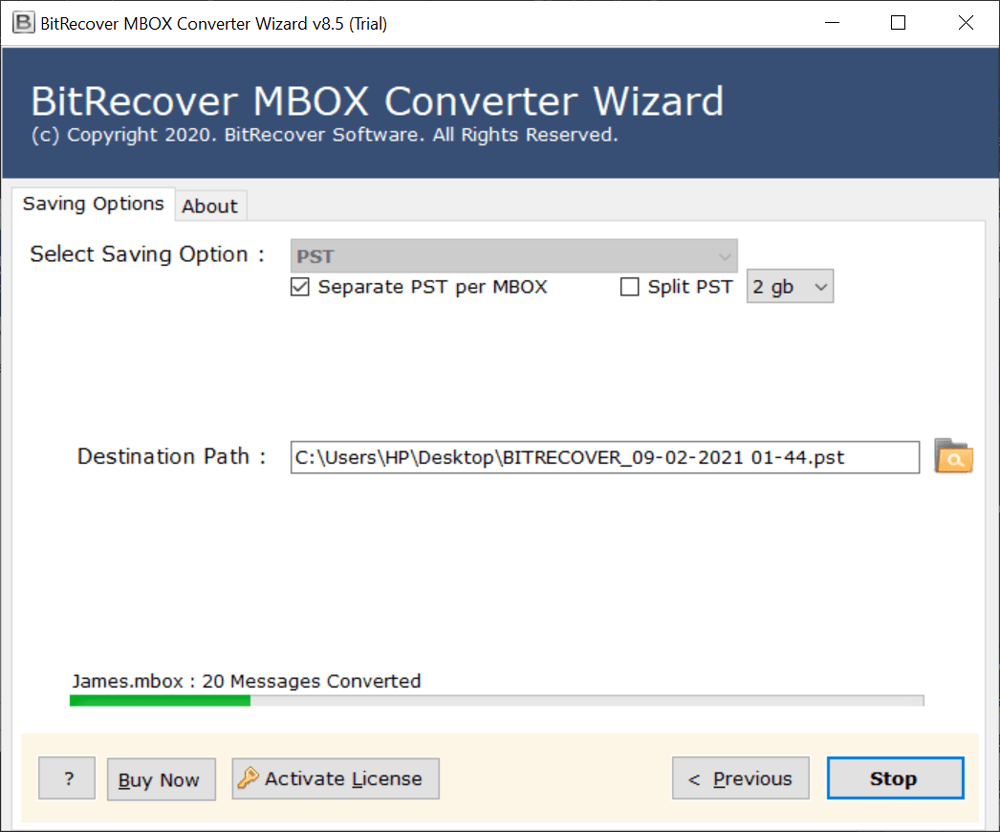
There are some advanced options if the user chooses the PST file format to save MBOX file. Some of them include “Change Language,” which gives 10 options to change the folder name language, “Split”, which divides the output files into smaller sizes, and “Separate PST per MBOX”, which creates single output files once the process to convert MBOX completes.

Special Filter

Advanced Filter Option

In this MBOX email converter, there is a dedicated filter tab, which consists of multiple metrics to eliminate unwanted data from conversion. To access this feature, simply go to this tab and check the given checkbox. Some of the advanced filters include Date Range, From, To, Subject, Exclude Folders, Root Folder, Exclude Attachments, Use Client Submit Time, Create PST Per Year Wise, Use Microsoft Graphs, Import Settings, Export Settings, etc.

Destination Path

Destination Path Option

With this tool to convert MBOX files, users also get the feature to browse and select the location where they want to save the output file. Thus, one can store the files locally or on the path of any external device connected to the system. This ultimately leads to quick access to the files and better management of the data at the required locations.

Naming Option

File Naming Option

This best MBOX Converter also offers 10+ different file renaming options, which are predefined and contain metrics such as date variations, subject, from, and auto increment. This helps the user to save the output with a similar naming format, which is not just easy to manage but also quick to access according to the needs of the data stored in them.

System Specifications

Basic Requirements to Run MBOX Email Converter

mbox email converter
Version: 10.5
Size: 69.7 MB
MD5: 93b45586c45934555f68dd1bfb7f829d
Software Download: Download Now Download Now


Trial Limitations:
The free trial edition of this MBOX email converter supports only the first 25 files of each folder. It has the same interface as the licensed one, except for the file-size limitation.

Hard Disk Space: 100 MB of free hard disk space
RAM: Minimum 2 GB RAM
Processor: Intel® Pentium 1 GHz processor (2.4 GHz is recommended)


Platforms:
Windows OS 11 (64 bit), 10, 8, 7 (32 bit or 64 bit) & Windows Server 2022, 2019, 2016, 2012 R2, 2008.


Product Guide:
Software Guide   Installation   Uninstallation   EULA  

Step-by-Step Guide

How to Convert MBOX File Using This Tool?

install the tool
choose mbox
select saving option
select saving destination
convert mbox files

Visual Guide

Tutorial of MBOX Email Converter

Ease-of-Use 98%
Data Safety & Originality 99.9%
Client Satisfaction 100%

Feature Comparison

MBOX Email Converter Free vs Paid Editions

Best Value
Features

Free

$0

Full Version

$29 $59

Dual MBOX Selection Modes
Mailbox Preview in Detail
Access to Advanced Filters
SavingsLog.txt Report Creation
Supports All Email Attributes
Saving Location and Naming Option
Unlimited MBOX File Conversion

 Download Now

 Purchase Now

Money Back Guarantee

30-Days Money
Back Guarantee

Safe & Secure

100% Safe
 & Secure

Tech Support

Free
Tech Support

User Queries

FAQS to Convert MBOX File

Yes, our MBOX file converter is very compatible and thus supports all MBOX file formats, including MBX, MBOXO, MBOXRD, MBOXCL, and more.

Yes, this is the best MBOX file exporter that effortlessly converts thousands of MBOX files without any limitations or restrictions. However, the free trial version only supports the first 25 files from each folder.

Of course, yes, it is completely safe from viruses and other malware. The best thing is that it even runs in offline mode when the user converts MBOX to any other file format. This makes it a safe and secure utility.

Our MBOX email converter also has multiple advanced filters, among which one is Date Range. It allows the user to select the start date and end date to fix the desired time frame and do a decluttered output.

This MBOX email converter is completely standalone, which means the user does not need any third-party assistance to convert MBOX files into different formats.

Yes, in this MBOX email converter, one can easily click on the saving destination option and then browse and select the path of the connected pen drive to effortlessly store the output data.

Expert’s Assistance

We are here to help!

You can directly connect with our support team in case of any queries or problems throughout the process to convert MBOX file. They will shortly provide you with the best assistance or even schedule an online meeting, if required. Apart from this, you can also opt for the MBOX conversion services in which our experts remotely do the certified process on your behalf. Plus, just by discussing your work demands with our team, you can also customize or add a new feature to this MBOX converter.

Customer Reviews

Client Testimonials of MBOX Email Converter